Deal Configuration
Deal Configuration allows you to manage Deal Types, Deal Stages, Product Types, Construction Types, HOA Types, Asset Classes, GC Estimate Types, Funds, and Fund Entities. All of these are items found in an individual deal and each has their own section in Deal Configuration.
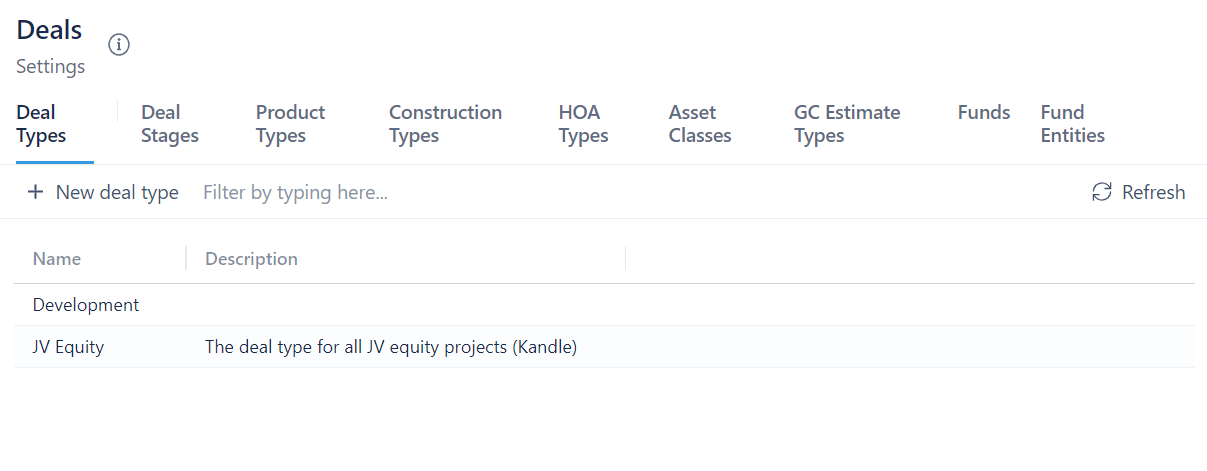
Deal Types
A Deal Type is selected when creating a new deal. This section of Deal Configuration allows you to add new deal types.
To add a new deal type:
- Click on + New Deal Type
- Enter the name of the new deal type
- Enter a description for the deal type
- Click Create Deal Type
Other
Every other page after Deal Types gives you the ability to add, edit, disable/enable, and delete items. Below are instructions that apply to each page.
To add a new item:
- Click on + New ...
- Enter a name
- Click Create
To edit an item:
- Click on the item you want to edit
- Click on Actions
- Select Edit selected ...
- Change the name
- Click Rename
To disable/enable an item:
- Click on the item you want to enable/disable
- Click on Actions
- Select Disable/Enable selected ...
- Click on Yes, disable/enable ...
To delete an item:
- Click on the item you want to delete
- Click on Actions
- Click on Delete selected ...
- Click on Yes, Delete ...
You cannot disable/enable Funds or Fund Entities.